


CONTOUR DIABETES app (US)
3.31.70K Reviews
App Specs
- Version
- 3.5.0
- Updated On
- License
- Free
- Downloads
- 100,000+
- Developer
- Ascensia Diabetes Care
- Categories
- Medical
- Platform
- Android
Screenshots
 Analysis by AppCompare
When I look at a diabetes app, I am less interested in a long feature list than in one practical question: does it make blood glucose monitoring easier to understand and maintain? That is the useful angle of CONTOUR DIABETES, a free medical app from Ascensia Diabetes Care. Its purpose is to support blood glucose monitoring, but its real value depends on how consistently you use it alongside a compatible CONTOUR blood glucose meter and your existing care routine.
I approached it as a companion for everyday tracking rather than as a replacement for medical advice. That distinction matters. An app can help you notice patterns, prepare better information for an appointment, and reduce the friction of recording readings. It cannot diagnose a problem, adjust treatment safely on its own, or turn an isolated number into a complete picture of your health.
The app has been available since late 2016 and currently appears as version 3.5.0, with support beginning at Android 5.0. It is rated for Everyone, which fits its straightforward presentation, although the subject matter naturally calls for responsible use by adults, parents, and caregivers. With over 100 thousand installs, it is an established option rather than an obscure experiment, while its average rating of 3.3 from around 3 thousand ratings suggests that the experience is useful for some people but not equally smooth for everyone.
Turning individual readings into a monitoring routine
I find it useful to treat the app as part of a repeatable sequence, not just a place to look up a number: take the measurement, make sure the record is clear, and add the context that will help me interpret it later. That small pause can make the difference between a history that is merely stored and one I can use in a conversation with a clinician. From there, the next question is how that routine holds up when I am away from home.
The capability that matters most
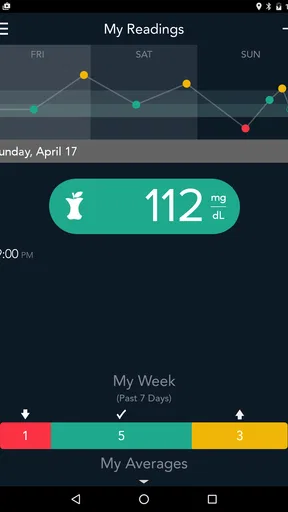
The central capability I found most meaningful is the app’s role in organizing blood glucose readings into a record that can be reviewed over time. A single result is easy to remember incorrectly or judge emotionally. A structured history gives you something more useful: context. You can look back at readings instead of relying on memory when discussing your routine with a clinician or trying to understand what happened during a difficult day.
That sounds simple, but it changes the task from “check a number and move on” to “build a usable record.” The distinction is especially important when readings happen at different points in the day. Morning results, readings around meals, and measurements taken when you feel unwell do not carry the same context. A record becomes more valuable when you can connect the number with the moment in which it was taken.
I would not describe this as a general wellness diary. Its focus is narrower and more useful for people who already monitor blood glucose and want a dedicated place for that information. The app is most convincing when it stays close to that job instead of trying to become a complete replacement for a care team, a meter, or a written treatment plan.
Worth Reading Before You Choose

EA SPORTS FC Mobile 26 Is a Bigger Football Game, but It Takes Time

Flipboard Shows What News Apps Must Do Beyond the Feed

Switching to Android Auto Means Rethinking Your Driving Routine

Google Calendar Makes a Crowded Week Easier to Manage

Ludo King Makes the Most of the Minutes Between Plans

Baby Panda World Brings Quick Play to Modern Phones, but Its Game Library Feels Busy
Why the meter relationship is important
The experience makes the most sense if you already use a compatible CONTOUR meter. The meter produces the measurement; the app gives you a digital way to keep and review the result. That division of labor is worth understanding before installing it. The application is not a standalone glucose sensor, and your phone cannot provide a reading simply because the app is open.
For me, this is a strength when the hardware and phone fit naturally into the same routine. It can reduce the temptation to keep scattered notes in a notebook, a messaging thread, or a general spreadsheet. It also keeps diabetes-related information in a purpose-built space rather than mixing it with unrelated health notes.
The trade-off is equally clear: if you do not use a compatible CONTOUR meter, the app may not be the most sensible choice. A generic health journal could be more flexible for manually entering information from different devices, while another manufacturer’s app may be better integrated with its own meter. The right decision depends less on the app alone than on the equipment already in your home.
How I would use it after a reading
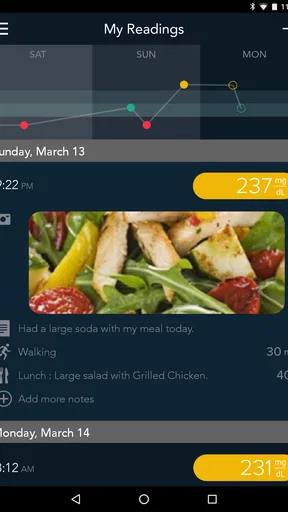
My recommended workflow is deliberately boring. I would take the reading as instructed for the meter, open the app when convenient, check that the result has been captured or recorded correctly, and add the context that will matter later. That might include whether the reading was taken before or after eating, whether the day was unusual, or whether I was checking because I felt different from normal.
The important habit is to avoid treating the app as a place to collect numbers without meaning. If you enter a result while distracted, then never review it, you are gaining storage but not much understanding. I would set aside a short, regular moment to look back at recent entries and notice whether the record is complete enough to discuss with a professional.
A practical tip is to record context as close to the measurement as possible. Trying to reconstruct an entire day later is unreliable, especially when meals, exercise, stress, and symptoms blur together. The app becomes more useful when it receives small pieces of information at the right time rather than a rushed batch of guesses at night.
A realistic day with the app
Imagine someone who checks blood glucose before breakfast, has a busy workday, and takes another reading around a meal. In the morning, the app can serve as the place where the result is kept instead of being left on the meter’s screen or written on a loose piece of paper. Later, adding a short note about an unusual meal or a disrupted schedule can prevent that reading from looking mysterious when reviewed days afterward.
At an appointment, the benefit is not that the app makes a medical decision. The benefit is that the person can arrive with a clearer record and better questions. Instead of saying, “I think my readings have been strange lately,” they can point to the period they want to discuss and explain what was different about those days.
For a caregiver, the same workflow can help maintain a shared routine, but I would be careful about assuming that digital access automatically solves communication. The person using the meter still needs to understand what is being recorded, and any treatment concern should go to the appropriate clinician rather than being settled inside the app.
What the record can and cannot tell you
A history is useful for spotting recurring situations, but it does not explain every cause. A result may be influenced by food, activity, illness, stress, timing, medication, sleep, or measurement technique. The app can help preserve the result and its surrounding notes; it cannot independently determine which factor is responsible.
This is where I think disciplined interpretation matters. I would use the record to identify questions, not to make confident conclusions from one unusual entry. If a pattern concerns you, bring the relevant information to a healthcare professional. The app supports that conversation; it should not become the authority that replaces it.
The best scenario for this app
The strongest use case is someone who already owns a compatible CONTOUR meter, checks blood glucose regularly, and wants a more organized digital record without paying for the app. That person is likely to notice the benefit quickly because the application fits an existing behavior instead of asking them to invent an entirely new one.
It is also a good match for someone who is preparing for a routine appointment and wants to improve the quality of the information they bring. A neat record can make it easier to explain what was happening around specific readings, particularly when the previous alternative was memory alone.
I can also see value for a newly organized routine, provided expectations stay realistic. The app may encourage consistency because it gives the monitoring process a visible home. Still, the motivation has to come from the person and their care plan. No tracking tool can compensate for readings that are skipped, entered inaccurately, or never reviewed.
Where the experience may feel limited
The average rating indicates that the app is not universally satisfying, and I think the likely source of frustration is the gap between a focused monitoring companion and the broader expectations people bring to health software. Someone may want one application to combine glucose readings, meals, exercise, medication schedules, coaching, and detailed clinical analysis. This app should not be chosen on the assumption that it will replace every other part of that system.
There is also a learning curve whenever a health app is connected to a device-based routine. Pairing, recording, checking that information has transferred correctly, and remembering to keep the phone and meter workflow consistent can feel like extra work. Even when the process is reliable, it adds another step compared with simply reading the value from the meter and moving on.
That extra step is worthwhile only if the resulting history is something you will actually use. If you prefer paper, have very occasional monitoring needs, or already rely on a different platform that works well with your equipment, switching may create more friction than benefit. Free does not mean costless in terms of time and attention.
Privacy and practical responsibility
Blood glucose information is personal, so I would treat the phone containing this app as part of my health record. I would use ordinary device security, avoid leaving sensitive information visible on an unlocked phone, and think carefully before sharing screenshots or account access. These are not reasons to avoid the app; they are sensible habits for any digital medical record.
I would also keep the meter and the app aligned. If a result looks unexpected, I would first verify the entry and measurement circumstances rather than assuming the software or the number is automatically correct. Following the meter’s instructions and asking a clinician about persistent concerns is more important than making the app’s history look tidy.
When another option may be better
A different manufacturer’s companion app may suit you better if your meter is not from the CONTOUR family or if your current device already has a well-established digital workflow. A general health journal may be preferable when you need to combine glucose information with many unrelated health details and do not need a meter-focused environment.
Likewise, people who want intensive coaching, broad lifestyle tracking, or a platform used directly by a care team should compare those needs carefully before settling on this app. The focused approach is its advantage for straightforward monitoring, but it is also the reason it may feel narrow to someone looking for a complete diabetes management system.
Who gets the most from it
I would recommend trying it first to people who use a compatible CONTOUR meter and want to move away from loose notes or unreliable memory. The free price removes an obvious barrier, and the Everyone content rating makes it approachable for a wide audience. Its value increases when you are willing to add context and review the record rather than merely storing readings.
It may also help family members supporting someone with regular monitoring, as long as everyone understands that the app is a record-keeping aid and not a substitute for professional guidance. The person with diabetes should remain involved in understanding their own readings and care instructions whenever possible.
I would be more cautious about recommending it to someone who expects automatic clinical interpretation, a complete medication manager, or compatibility with any glucose meter. Those expectations point toward a different kind of product. The app is at its best when the goal is specific: make blood glucose monitoring easier to document and easier to discuss.
My final view after weighing the trade-offs
CONTOUR DIABETES succeeds when it turns a repeated measurement into a record you can use. Its most important contribution is not a flashy extra; it is the practical bridge between taking a reading and remembering what that reading means in the context of your day. For the right meter owner, that can make appointments and everyday self-management more organized.
I would not install it expecting the app alone to improve control or explain every result. I would install it when I had the matching monitoring setup, a genuine need for better records, and the patience to keep the information meaningful. In that situation, Ascensia Diabetes Care’s free medical app is a sensible companion, though its focused design and device relationship mean it will not be the best fit for everyone.
My recommendation is therefore conditional but positive: use it if your equipment and habits match its purpose, and judge it by whether it helps you maintain a clearer, more useful monitoring routine. If it adds more steps than insight, your meter’s existing workflow or another health-record option may serve you better.
Pros
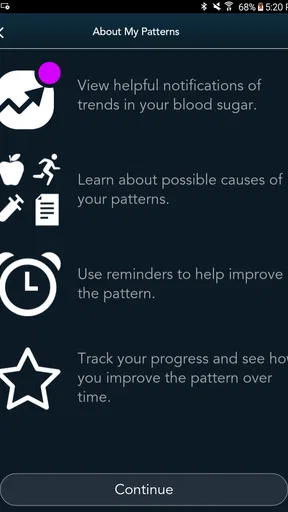
- Clear glucose trends help identify patterns over time.
- Personalized reminders support regular blood sugar checks.
- Easy data sharing can simplify conversations with healthcare providers.
- Supports notes for meals
- exercise
- medication
- and other readings.
- Designed for use with compatible CONTOUR blood glucose meters.
Cons
- Most features require a compatible CONTOUR meter.
- Bluetooth pairing may need troubleshooting on some phones.
- Not a replacement for professional medical advice or diagnosis.
- Manual entries can become time-consuming without consistent tracking.
- Availability and features may vary by country and device model.
FAQs for CONTOUR DIABETES app (US)
What is the CONTOUR DIABETES app used for?
The CONTOUR DIABETES app is designed to help people manage blood glucose readings collected from compatible CONTOUR blood glucose meters. After pairing a meter, the app can organize results, display trends and charts, record notes such as meals or activity, and provide reminders. It is a support tool for diabetes self-management, not a replacement for professional medical advice or treatment decisions.
Which blood glucose meters work with the CONTOUR DIABETES app?
Compatibility depends on the specific CONTOUR meter model and the country where it was purchased. Many supported meters connect to the app through Bluetooth, but not every CONTOUR device can pair with it. Before downloading, check the official Ascensia Diabetes Care compatibility information and confirm that your meter, smartphone, operating system, and regional version are supported.
Does the CONTOUR DIABETES app provide medical advice or adjust medication?
No. The app can help identify patterns and may offer features such as reminders, summaries, or personalized insights based on the information entered, but it does not replace a doctor, diabetes educator, or pharmacist. It should not be used to diagnose conditions, change insulin doses, or alter medication without professional guidance. Always follow your prescribed care plan.
Can I share my glucose information with a healthcare professional or family member?
The CONTOUR DIABETES app includes options that may allow users to review, export, or share diabetes data, depending on the app version, device, and available regional features. Sharing can make appointments more productive by giving healthcare professionals access to organized readings and notes. Review the recipient and privacy settings carefully before sending personal health information.
Is the CONTOUR DIABETES app free, and what permissions does it require?
The app is generally available to download without a separate purchase, although compatible meters, test strips, mobile data, or other services may involve costs. During setup, it may request permissions needed for Bluetooth pairing, notifications, and related functions. Availability and requirements can vary in the United States, so read the App Store or Google Play listing and privacy policy before installing.


